The LinkedIn first comment: what to put in it and when
The first comment carries your link, the source of a number or one real question. Here is what to write, when to post it, and why a tool should never post it for you.

Published 9 min read
On this page (8)
The LinkedIn first comment is the reply you leave under your own post. It is where the link goes, along with the source of a number or one specific question that starts the right conversation. Post it within minutes of the post going live, while the first readers are arriving. And paste it yourself: a tool that posts comments for you is acting inside your account.
GoReach writes a first comment for every post and hands it to you to paste. That last part surprises people, so further down I explain why I think it is the right trade for ten seconds of your time.
What is the LinkedIn first comment for?
A post has one job: make the reader stop, read and think about one thing. Anything that pulls them away from that job does better underneath it. A link to another site, a list of credits and a wall of hashtags all belong lower down, or nowhere.
So the first comment has three good uses.
- The link. If the post refers to an article, a tool or a booking page, the link sits in the first comment and the post says so in one line: "Link in the first comment."
- The detail that did not fit. The source of a number, the method behind a result, a correction, the long version of a list. The readers who care will look, and the post stays short.
- A specific question. One tied to the post, that someone with real experience could answer. "What did you change first when churn went up?" invites an answer. "Thoughts?" invites nothing.
Every draft GoReach writes, on every plan, comes with a first comment written for it. You read the pair together before you approve anything.
Should you put the link in the first comment on LinkedIn?
Yes, if the post needs a link at all.
I want to be careful here, because this is the most repeated piece of LinkedIn advice and most of it comes with a made-up percentage attached. LinkedIn does not publish how it weighs a link in a post. Anyone quoting a precise penalty is guessing. What people who post often keep observing, and what our reach checklist is built on, is that posts with a link in the body tend to travel less far. That makes sense to me: the feed wants people to stay, and a link asks them to leave.
Moving the link down is normal and readers expect it. It stays one tap away, and the post gets judged on what it says.
Two caveats, said plainly. Nobody outside LinkedIn knows whether a link in a comment carries a cost of its own. And a post that exists only to send people somewhere else is still a weak post, wherever the link sits. If the post stands up without the link, the link is a bonus.
The GoReach grader flags a link in the body, and its fix moves the link into the first comment. On Autopilot the posts are written that way from the start, so there is nothing to catch.
Four first comments that work
Here are four patterns. The examples are made up for this post; the shapes are the point.
The link, with one line about what is there.
"The full breakdown, including the spreadsheet we used to model it: [link]"
The number behind the post.
"For anyone asking: this is across 41 client accounts from January to June, measured as revenue
retained at month twelve."
The detail that would have made the post too long.
"The two things we tried first and dropped: weekly check-in calls (clients skipped them) and a
shared dashboard (nobody opened it after week two)."
A real question.
"If you run a practice with more than three hygienists, how do you decide when to hire the next
one? Genuinely curious, because nobody I've asked does it the same way."
Each one adds something the reader did not already have. None of them asks for a reaction.
GoReach picks the pattern from the post itself. A post with a link gets the link comment. A post with a number gets its source. A story gets a question a peer could actually answer. If you write your own posts on Pro, you can ask for fresh options and keep the one you like.
What should a first comment never say?
Comment bait. "Comment YES and I'll send it to you." "Agree?" "Drop a fire emoji if this helped." The people you most want to reach recognise it instantly, and it costs you more with them than it earns. The grader flags it in any wording, and we publish the comment bait patterns we flag so you can check the list yourself.
Tagging strangers to borrow their audience reads the same way.
Engagement pods are worse. LinkedIn's Professional Community Policies ask members not to do things that artificially increase engagement with their content, and to avoid agreeing with others ahead of time to like or re-share each other's content. That is a pod, described precisely.
The writer inside GoReach is held to the same list the grader checks. The comments it writes carry no bait, no tag lists and no hashtag walls, and it has no way to join or run a pod.
How soon should you post the first comment?
Within the first hour, and ideally within minutes. The comment should already be there when early readers arrive, because they are the first people the post reaches and the most likely to want the link.
This is the part busy founders actually miss. A scheduled post goes out at 9am while you are in a meeting, and by the time you remember the comment it is lunchtime.
The first hour is also when other people's comments come in. Replying to them by hand, with something more than "thanks", keeps the conversation going. That part stays yours, and I think it should.
When a post goes live through GoReach, we email you about ten minutes later with the comment ready. One press copies it and opens your post, so pasting takes seconds. On Autopilot the comment arrives with the post when it reaches you for approval, in the app or on WhatsApp, so you have already read it before it is needed.
Can a tool post your LinkedIn first comment for you?
Some can. GoReach will not, and here is the reasoning.
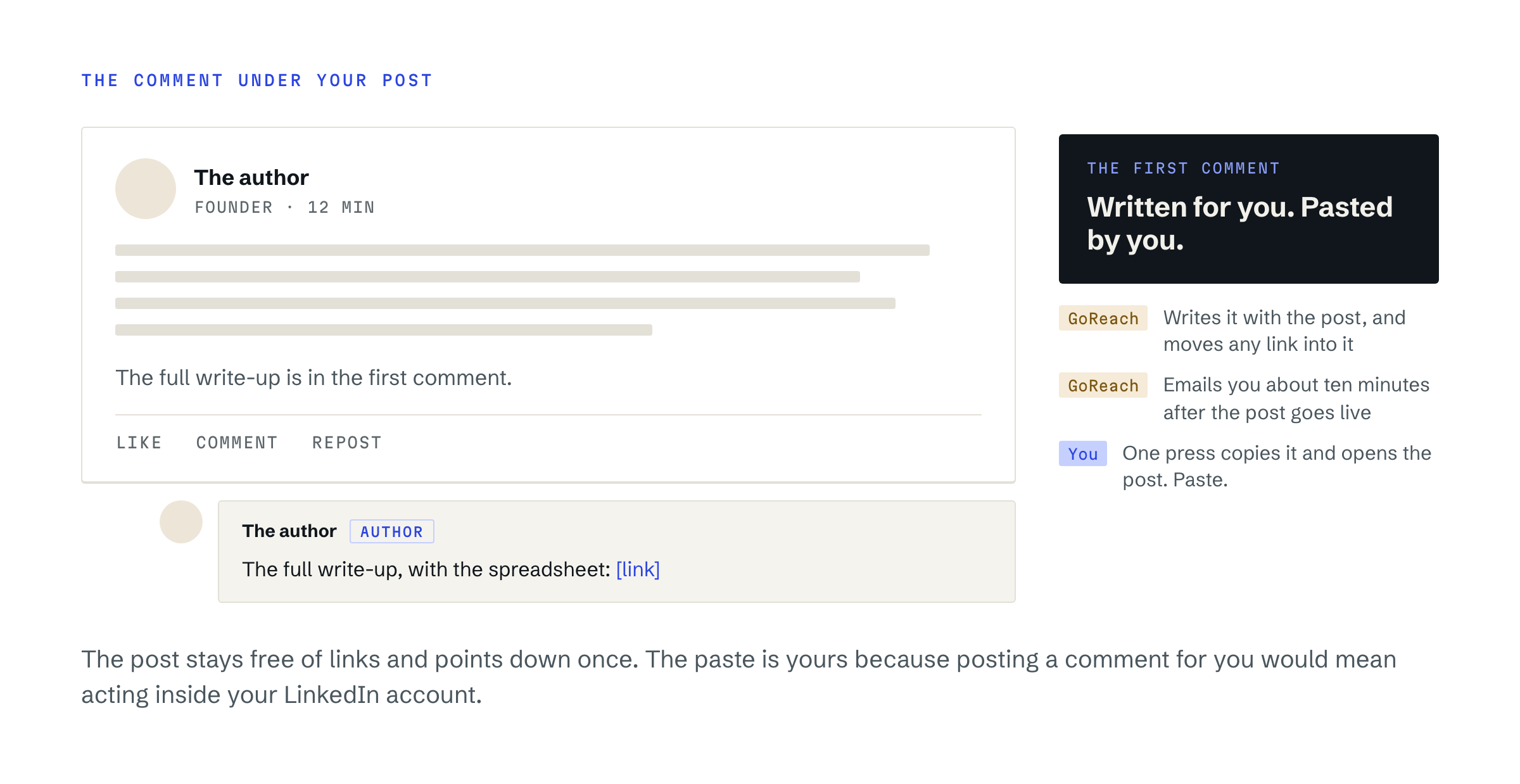
Posting a comment on your behalf needs a LinkedIn permission GoReach does not hold. The other way tools get a comment onto your post is by running software in your browser, or by logging in as you. LinkedIn's help page on prohibited software and extensions says it does not permit third-party software or browser extensions that scrape, modify the appearance of, or automate activity on its website, and that members who use them risk having their accounts restricted or shut down.
When I was deciding how GoReach should work, this was the easiest call I made. Your LinkedIn account is years of connections and reputation. Putting it in that position to save you ten seconds is a bad trade, and I was not willing to make it on your behalf.
So the line is the same everywhere in the product. GoReach publishes your approved posts through LinkedIn's official API, with the permission you grant when you connect. It never logs in as you. It does no scraping, and it sends no automated likes, comments, connection requests or DMs. The first comment is handed to you to paste.
That makes it, as far as I know, the lowest-risk way to automate your LinkedIn: built to stay within LinkedIn's rules. No tool can promise how LinkedIn will treat an account, and I would be suspicious of one that did. The longer version is in is LinkedIn automation safe, and the comparison with tools that act inside your account is its own post.
The whole first comment strategy, off your plate
Done properly, a first comment means deciding what it should carry, writing it in your voice, keeping the link out of the post, avoiding every bait pattern and remembering to post it inside the hour. By hand that is a few minutes per post, plus the one step a busy week makes you forget.
With GoReach it is one press. On Pro you write the post, and GoReach writes the comment, grades the post and reminds you. On Autopilot the post and its comment are both written for you from your own material, and you approve them together. Both are on the pricing page: Pro is $49 a month and Autopilot is $199 a month.
Before you change anything, run your last post through the free grader. It will tell you whether the link was in the body. It needs no signup.
Questions founders ask
Should I put links in the first comment on LinkedIn?
Yes, if the post needs a link at all. Keep the body free of links, put the link in your first comment and point to it in one short line. LinkedIn does not publish how links are weighed, so treat this as the widely observed habit it is.
How soon should I post my LinkedIn first comment?
Within the first hour, ideally within minutes of the post going live. GoReach emails you about ten minutes after publishing with the comment ready, and one press copies it and opens the post.
Can a tool post my LinkedIn first comment automatically?
Only with a LinkedIn permission few apps hold, or with software that acts inside your account, which LinkedIn's rules restrict. GoReach does neither. It writes the comment and hands it to you to paste.
Is LinkedIn comment automation safe?
Tools that comment for you usually do it through browser software or by logging in as you, and LinkedIn says members using that kind of software risk restriction. The lowest-risk route is to have the comment written for you and paste it yourself, which takes seconds.
Does commenting on my own post help its reach?
LinkedIn does not publish that, so I will not claim it. What a good first comment reliably does is give readers the link or detail they wanted and start a conversation that other readers can see.