How to check a LinkedIn post before you publish it
Five things most often stop a LinkedIn post travelling. How to check for each by hand, with a worked example, and where a grader saves you the minutes.

Published 9 min read
On this page (7)
To check a LinkedIn post before posting, look for the five things that most often stop it travelling: the strongest line sitting below the fold, about 140 characters on a phone, a link in the body, an ending that fishes for engagement, formatting that fails on a phone, and writing that reads as machine-made. GoReach checks all five on every draft and fixes each in one click.
If you only want the answer for one post, paste it into the free LinkedIn post grader. It runs the same checklist, with no signup. The rest of this piece explains what each check looks for, so you can do it yourself and know why it matters.
How to check a LinkedIn post before posting, by hand
Here is the routine I would run on any draft. It works best on a phone, because that is where most people will read the post.
- Read only the first 140 characters, counting blank lines: that is what a phone shows. Ask whether a stranger would know what the post is about.
- Search the body for a link.
- Read the last two lines out loud. If they ask for a comment without asking anything real, that is bait.
- Scroll the whole thing on a phone and look at the shape before the words.
- Read it once more as a sceptic and mark anything that sounds like every other post.
Each step maps to one of the five problems below.
1. The best line is below the fold
LinkedIn shows roughly the first 140 characters on a phone, and about 210 on a desktop, before "see more", and line breaks count toward that. Anyone who does not tap never sees the rest, so a strong line in paragraph three is a line most readers miss. We measured where the cut falls and wrote up why the fold sits where it does.
The opening line also wants a blank line under it, so it stands on its own as an opening.
GoReach flags a long or buried hook, and inside the product it finds where your strongest line actually sits and offers to lift it to the top.
2. A link in the post body
This is the most common fixable problem we see. The usual fix is to move the link to the first comment and say so in one line, so the reader is still one tap away and the post itself stays clean.
GoReach flags the link, moves it in one click, and writes the first comment for you to paste once the post is live.
3. An ending that fishes for engagement
"Agree?", "Thoughts?", "Comment YES and I'll send it" and "Tag someone who needs this" are engagement bait. LinkedIn's Professional Community Policies say plainly: "Don't do things to artificially increase engagement with your content." Readers recognise these lines too.
A specific question tied to the post is fine. I would go further: it is often the best last line you can write, because it gives the reader something to answer. GoReach's grader knows the difference: it flags bait in any wording and leaves a real question alone.
4. Formatting that fails on a phone
The usual culprits are one dense block with no breaks, bullets made of asterisks (LinkedIn has no markdown, so they show as stray symbols), a post past about 2,600 characters, more than three hashtags, and hashtags in lowercase, which screen readers cannot split into words.
None of this is about the writing. It is the easiest problem to miss on your own draft, and a checker spots it in a second; the one-click fixes tidy it without touching what you said.
5. Writing that reads as machine-made
Stock openers, a handful of overused words, the flip where one idea is set up only to be swapped for another, and long dashes. Readers have seen these a thousand times and they skim past them.
GoReach runs every draft against a fixed list of 24 words, 10 phrases and 30 opening formulas, plus the flip in every form, and its writer is held to the same list, so it will not produce what the grader would mark down.
A worked example
Here is an invented draft of the kind that comes through often.
I've been thinking a lot about pricing lately.
When we started, we charged per seat. It felt fair and it was easy to explain. Then a customer with forty seats told us they were rationing logins to keep the bill down, and I realised our pricing was teaching people to use less of the product.
We moved to a flat fee per company last March. Early churn fell by about half.
Full write-up here: example.com/pricing-story
Agree? Let me know in the comments.
[five lowercase hashtags: pricing, saas, startups, founders, growth]
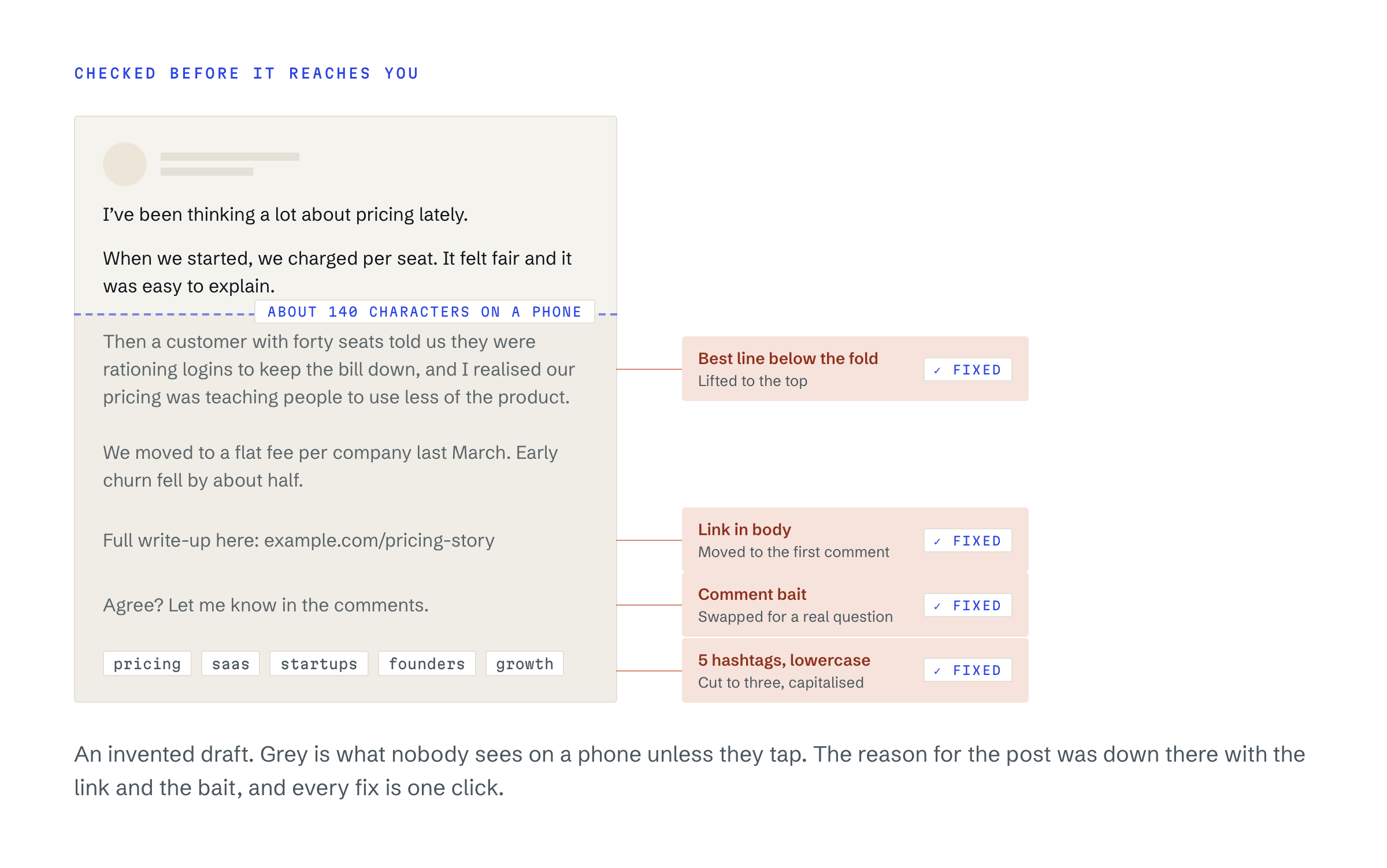
Count it out and the cut lands in the middle of the customer story, so the strongest line, that the pricing was teaching people to use less of the product, sits below the fold. There is a link in the body, two comment-bait patterns in one line, and five lowercase hashtags. After the fixes:
A customer with forty seats told us they were rationing logins to keep their bill down.
Our pricing was teaching people to use less of the product.
When we started, we charged per seat. It felt fair and it was easy to explain. So we moved to a flat fee per company last March, and early churn fell by about half.
If you have changed how you charge, what made you do it? The full write-up is in the first comment.
[three capitalised hashtags: Pricing, SaaS, Founders]
Same story, same facts. The reader who never taps "see more" now gets the whole point of the post. In GoReach those changes are a handful of clicks, and on Autopilot the draft arrives already in the second shape.
How the LinkedIn post score works
The grade is deterministic. The same post always gets the same result, and each problem names its fix. I wanted it that way because a grade that changes when you paste the same draft twice is useless for deciding anything.
Every draft starts at 100, and each issue subtracts a fixed penalty by band: 25 for problems that cut distribution, 12 for ones that limit it, 4 for polish. A post is ready when nothing in the first two bands is left, whatever the number says. The full checklist lists all thirteen checks and what each one costs.
What a LinkedIn post checker cannot tell you
No checklist can tell you whether an idea is good. None can tell you how many people will see a post either, and any tool that predicts impressions is guessing.
What a checker stops is the avoidable failure: a good idea that nobody reads because of a link in the wrong place. That failure is common, and it is the cheap one to fix.
Checked, then published within LinkedIn's rules
Once a post is ready, GoReach publishes or schedules it through LinkedIn's official API, with the permission you grant on LinkedIn's consent screen. It never logs in as you, does no scraping and sends no automated likes, comments, connection requests or DMs, and the first comment is handed to you to paste. It is built to stay within LinkedIn's rules, which makes it the lowest-risk way to automate your posting that I know of. No tool can promise how LinkedIn treats an account, and we do not.
Where to start
Paste a post that underperformed into the free LinkedIn post grader. It checks three posts a day, needs no signup, and discards the draft once it is graded. An old post is the best test, because the problems that show up there tend to be habits you are still repeating.
If you want every draft checked and fixed as you write, that is Pro, at $49 a month or $490 a year. If you want the posts written, checked and scheduled for you to approve, that is Autopilot, at $199 a month or $1,990 a year. Both are in US dollars, with no free plan and no free trial; ask within 14 days of your first payment and we refund what we received. Payment processing fees are not returned.
Questions founders ask
Is there a free LinkedIn post checker?
Yes. The GoReach post grader checks three posts a day with no signup, and discards each draft after grading it. It is the only free part of GoReach; every plan is paid.
Is there a LinkedIn post grader that fixes the problems?
Inside GoReach, each issue the grader finds comes with a one-click fix, and on Autopilot drafts are checked and revised before you see them. The free grader lists the issues and the fix for each, and leaves the editing to you.
Does a high LinkedIn post score mean more reach?
No tool can promise that. A high score means the post has none of the problems that commonly stop a post travelling. Whether it lands still depends on the idea and the audience.
Can a LinkedIn post review run automatically before I publish?
Yes. In GoReach every draft is graded as you write it, and on Autopilot an editor runs the checks and revises the draft before it reaches you for approval. Nothing publishes until you approve it.
Can GoReach publish the post after checking it?
Yes, through LinkedIn's official API, once you approve it. It publishes immediately or at a scheduled time, and never posts anything you have not approved.