Reach readiness5 min read
Why the LinkedIn fold is 210 characters, and what to do about it
Line breaks count toward the truncation point, which is why a well-spaced post gets cut sooner than its word count suggests. A worked example, and the one line that wastes the visible space most often.
By Neeraj · Updated
LinkedIn cuts your post off and puts a "see more" link in the gap. Most advice tells you to front-load the good part. Almost none of it tells you where the cut actually falls, which is the only thing that makes the advice usable.
It is roughly 210 characters. Not words. Characters. And the detail that catches people out: line breaks count toward the total.
Why the line breaks matter so much
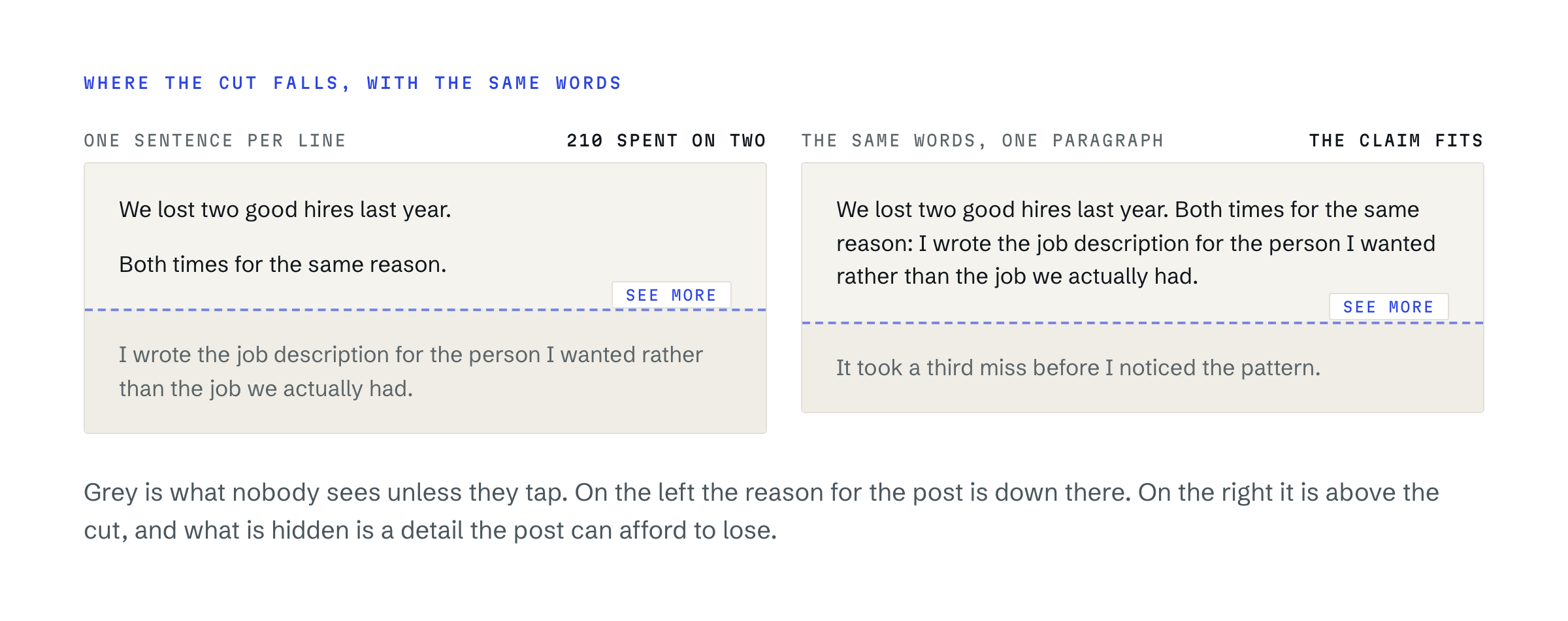
The convention on LinkedIn is one sentence per line with a blank line between. It reads well and everybody does it. It also means a post with generous spacing hits the truncation point far sooner than its word count suggests, because every one of those blank lines is spending your budget.
Three short lines with blank lines between them can consume the whole allowance before you have said anything. The same words as one paragraph would get you two sentences further.
This is not an argument for walls of text. It is an argument for knowing what the spacing costs, and spending it deliberately.
What 210 characters actually holds
It is less than people picture. Two average sentences, or one long one. The paragraph you are reading now is past the cut before this sentence ends.
A few reference points worth keeping in your head:
- A tight declarative sentence runs 60 to 90 characters. You get two, plus the blank line between them.
- A blank line costs one character, and the line it separates costs its own length. Four short lines with gaps is realistically 150 characters of text plus the overhead of the layout.
- An emoji costs more than one character in most encodings, and a run of them at the top is spending the most valuable space on decoration.
The exact cut moves a little by device and by how LinkedIn counts a given character, which is why the figure is "about 210" rather than a promise. Treating it as a hard 210 is the safe assumption: if you are right at the boundary, you have already written an opener that depends on luck.
The line that wastes it most
The single most common way to lose the fold is a tease. "Here's what makes this one special." "The results surprised me." "Let me explain."
A line like that occupies the most valuable real estate on the post and contains no information. The reader has to tap to find out what is special, and the overwhelming majority do not. You have spent your visible space promising rather than telling.
Delete the tease and whatever came after it moves up into view. That is usually the entire fix, and it takes ten seconds.
A worked example
Here is an opener that wastes the budget, with the character count running alongside it.
"I've been thinking about hiring lately. (41)
There's one lesson that took me three years to learn. (94)
And it cost us two good people. (126)
Here it is. (139)"
That is 139 characters, four lines, two blank-line gaps, and the reader has been told that a lesson exists. The lesson itself is below the cut.
The same material, opening on the thing:
"We lost two good hires because I wrote the job description for the person I wanted rather than the job we had. (113)"
One line, 113 characters, the whole claim visible, and 97 characters still in hand. A reader who never taps "see more" has still received the post.
What the grader actually checks
GoReach runs three separate checks on this one constraint, because there are three ways to lose it.
- Is the strongest line below the cut. Not the first line: the strongest one. A post whose best sentence sits at character 740 gets flagged with the offer to lift it.
- Is the hook too long. A single opening sentence that runs past the visible portion has already lost.
- Is the hook isolated. A blank line under the opener makes it stand on its own rather than running into the paragraph behind it.
Those are three of the thirteen checks in the reach checklist, and they are the three that fire most often on drafts people were about to publish.
How to check your own
Count the first 210 characters of your draft, including the blank lines, and read only that. If a stranger would not know what the post is about, or would have no reason to expand it, the post is already decided before anyone has read your argument.
Two questions that are worth asking of those 210 characters:
- Does it contain a fact, a number or a claim? Or only a promise of one?
- Would it still be interesting if the reader never expanded it?
The second question is the stricter one and the more useful. Treat the visible portion as the whole post and the expansion as a bonus.
What this is not
It is not a trick, and it does not make a weak post travel. The fold decides whether anyone reads what you wrote. What you wrote decides everything after that. Getting the first 210 characters right simply stops a good post being discarded before it is read, which is a more common failure than people think.