A safe alternative to LinkedIn automation tools
Browser extensions and cloud logins act as you on LinkedIn. An official-API publisher posts only what you approved. How the three kinds of tool compare.

Published 8 min read
On this page (7)
The safe alternative to LinkedIn automation tools is one that publishes through LinkedIn's official API instead of running in your browser or logging in as you. GoReach works that way: it researches, plans, writes and schedules your posts, publishes only the version you approved, and never sees your password. It is built to stay within LinkedIn's rules, and it is the lowest-risk way I know to automate your LinkedIn.
It does not do outreach. If you need connection requests and messages at volume, that is a different kind of tool, and I say so plainly further down.
Why founders look for a safe alternative to LinkedIn automation tools
Most LinkedIn automation tools were built for sales outreach: visit profiles, send connection requests, follow up by message. To do that on LinkedIn's website, a tool has to act as you there. It either runs as a browser extension inside your logged-in session, or it logs in to your account from a server.
LinkedIn is unusually direct about this. Its help page on prohibited software and extensions says it does not permit third-party software or browser extensions "that scrape, modify the appearance of, or automate activity on LinkedIn's website", and that members who use them "risk having their accounts restricted or shut down." Its page on automated activity explains what happens to an account that gets flagged.
For a founder, that is a poor trade. Your profile is where buyers, candidates and investors go to check you out. The hours a tool saves are worth less than a week locked out of the account people use to find you.
When I started building GoReach, reading those two pages settled the design before anything else did. The product would post, it would never log in as anyone, and it would leave every other action on LinkedIn to the person whose name is on the account.
How each kind of LinkedIn tool reaches your account
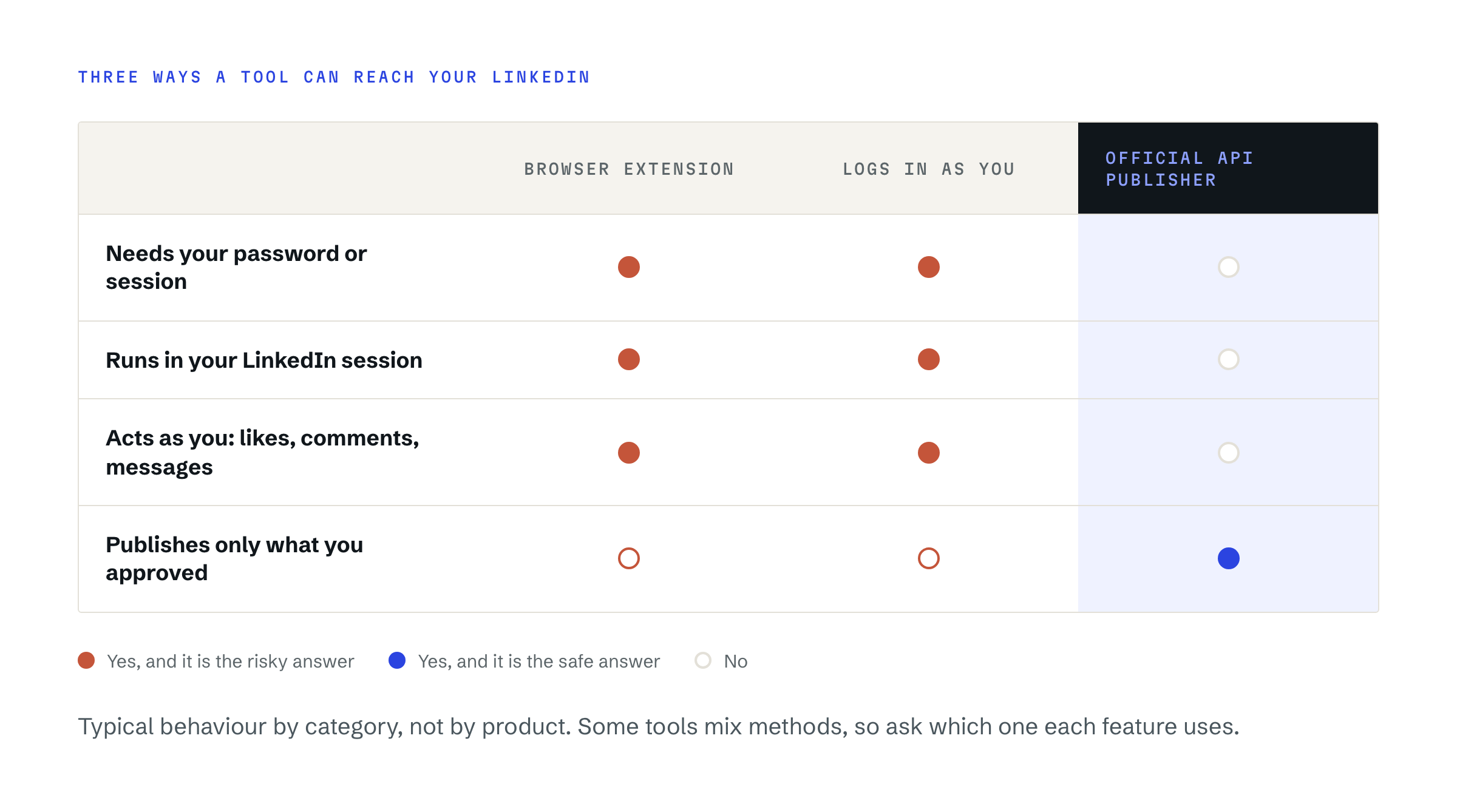
Compare tools by method. The brand on the box matters far less than how the tool gets into LinkedIn, and there are three ways it can.
The browser extension
An extension sits in Chrome while you are logged in to LinkedIn and acts inside that session. It does not need your password because it borrows the session you already opened. Liking, commenting, connecting and messaging as you is usually the whole point, and many extensions can also read profiles off the page. This is the exact category LinkedIn's prohibited software page names.
The cloud tool that logs in as you
Some tools run in the cloud instead. You give them your password or a session cookie, and a server or a remote browser operates your account from there. Nothing is installed on your machine, which can make it feel safer, but the account is still being driven by software pretending to be you, which is the activity LinkedIn's help pages describe.
The official API publisher
The third kind connects through LinkedIn's own consent screen and posts through the Share on LinkedIn API, which is the method LinkedIn offers apps that post for members. It never holds your password or your session, and it can do only what LinkedIn grants the app.
One caution. Some tools mix methods, publishing posts through the API while running outreach through an extension. If you are evaluating one, ask which method each feature uses, and assume the riskiest feature sets the risk for the whole account.
What do you give up with an official API tool?
Choosing the safer method costs you features, and you should know which ones before you switch.
- No outreach. An official-API publisher posts. It does not send connection requests or messages for you.
- No automated engagement. No auto-likes, auto-comments or reply bots.
- No scraped lead lists. Research comes from websites and the open web.
- The first comment is yours to paste. Posting a comment for you needs a LinkedIn permission GoReach does not hold, so it writes the comment and hands it to you with a one-press copy and an email reminder about ten minutes after the post goes live.
If outreach is the job, a posting tool will not do it, and I would not pretend otherwise. We wrote up GoReach compared with an outreach tool, including when the outreach tool is the right pick.
What it does instead: the hours behind every post
The hours in founder LinkedIn are mostly in the posts: deciding what to say, writing it well, making it sound like you and getting it out at the right time. That is about an hour a post by hand, or around thirteen hours a month at three posts a week, before any research.
Those are the hours GoReach takes. On Autopilot, $199 a month or $1,990 a year:
- It researches your business from your website and the web, never LinkedIn pages, and quotes every fact from its source for you to confirm.
- It tears down up to four competitors from their own websites and customer reviews, and writes a market brief.
- It sets your positioning and a strategy, then plans each month in themed weeks. You can change either.
- It writes every post in your voice from confirmed facts, edits it, and adds a first comment and an image card or document carousel where the post calls for one.
- Each post reaches you on WhatsApp or in the app with Approve, Change and Skip. Approved posts are scheduled through LinkedIn's official API.
Your part is designed around about fifteen minutes once and about five minutes a week. I do not have customer data on those figures yet; they are what the product is built around. If you would rather write your own posts, Pro at $49 a month or $490 a year gives you voice-matched drafts, a reach grade with fixes, first comments, image cards, and scheduling through the same official API. The full picture of LinkedIn on Autopilot, where you approve every post and the official API does the publishing, is in its own piece.
Is there a LinkedIn tool that doesn't need your password?
Yes, and that is the first thing to check. Here is how GoReach connects, as checked against our own code on 15 November 2026:
- Consent on LinkedIn's own page. You click Connect, LinkedIn shows what GoReach is asking for, and you approve it. GoReach asks for your basic profile and permission to post on your behalf. Nothing else.
- No password, ever. GoReach never sees or stores your LinkedIn password. Signing in to GoReach is separate, with Google or a password of its own. The LinkedIn permission is encrypted at rest, and you can revoke it from LinkedIn's settings at any time.
- Nothing in your browser. No extension, no plug-in, nothing running in your LinkedIn session.
- No scraping. GoReach's crawler refuses LinkedIn addresses outright.
- No automated actions. No likes, comments, connection requests or messages.
- Approval first. Nothing is published until you approve it. LinkedIn's Developer AI Policy asks developers to restrict automated posting of AI-generated content without the user's involvement, and approval on every post is how GoReach meets that.
That describes how GoReach works. No tool can promise how LinkedIn treats an account, and GoReach is not endorsed by LinkedIn. For the rules themselves, read what LinkedIn restricts, in its own words and what to automate and what never to.
How to switch from a Chrome extension
The switch is short.
- Remove the extension from your browser.
- In LinkedIn's settings, check which apps have access to your account and revoke any you no longer use.
- Connect GoReach through LinkedIn's consent screen.
- Point it at your website and add a few posts you have written so it learns your voice.
Autopilot does the research and sets a strategy from there, and the first posts reach you for approval once the strategy is approved: by Auto as soon as it is drafted, or by you if you review each step.
Questions founders ask
What is a good LinkedIn Chrome extension alternative?
A tool that publishes through LinkedIn's official API, so nothing runs in your browser or your LinkedIn session. GoReach connects through LinkedIn's consent screen, posts only what you approved, and installs nothing. It does no outreach, so if you used an extension for messaging, that part has no replacement here.
Is there a LinkedIn automation tool without a browser extension?
Yes. Tools that publish through LinkedIn's official API need no extension at all. GoReach researches, writes and schedules your posts that way, and runs nothing in your browser.
Is there a LinkedIn tool that doesn't need my password?
Yes. With an official-API tool you approve access on LinkedIn's own consent screen, and the tool never sees your password. GoReach works that way, and you can revoke its access from LinkedIn's settings whenever you like.
How do I know if a scheduling tool uses LinkedIn's official API?
Ask whether it needs your password, a session cookie or a browser extension. An official LinkedIn API scheduling tool needs none of them, and it connects through a LinkedIn consent screen you can see and revoke. Before paying for anything, you can try the free grader on a post of your own, or see the plans.
Can GoReach send connection requests or messages?
No. GoReach is for posting. It runs no automated connection requests, messages, likes or comments, and it does no outreach of any kind.