LinkedIn automation without getting banned
Automate the hours behind your posts and leave alone what LinkedIn restricts. A plain list of what to hand over and what should always stay with a person.

Published 9 min read
On this page (8)
LinkedIn automation without getting banned comes down to one split. Automate the hours behind your posts, the research, planning, writing and scheduling, and publish through LinkedIn's official API after you approve each one. Leave alone what LinkedIn's rules restrict: scraping, browser extensions, and automated likes, comments, connection requests and messages. GoReach automates the first list and does none of the second.
That split is what I mean when I say GoReach is built to stay within LinkedIn's rules. I would distrust any tool that promises your account is safe from restriction. Nobody outside LinkedIn controls how LinkedIn treats an account, and no tool can promise it. What you control is the method, and the method is what this piece is about.
Where a founder's LinkedIn hours actually go
Before deciding what to automate, it helps to see what the work is. For a founder posting three times a week, the hours fall into five piles.
- Deciding what to say. Who you are writing for, what they care about this month, what you can prove. Done properly that is research into your buyers and competitors: a long afternoon at the start, plus an hour or two each month.
- Writing. About an hour a post once you count finding the specifics, the opening and the second read. Around thirteen hours a month at three posts a week.
- Images and formatting. A card or a short carousel when a post needs one.
- Publishing at the right time for your buyers' time zone, which is often not yours.
- Engaging. Replying to comments and conversations once a post is live.
Most of the hours sit in the first four. They are also the four that can be automated without going anywhere near the behaviours LinkedIn restricts. The fifth is the one people are most tempted to automate, and the one I would never hand to software.
How to automate LinkedIn safely: what to hand over
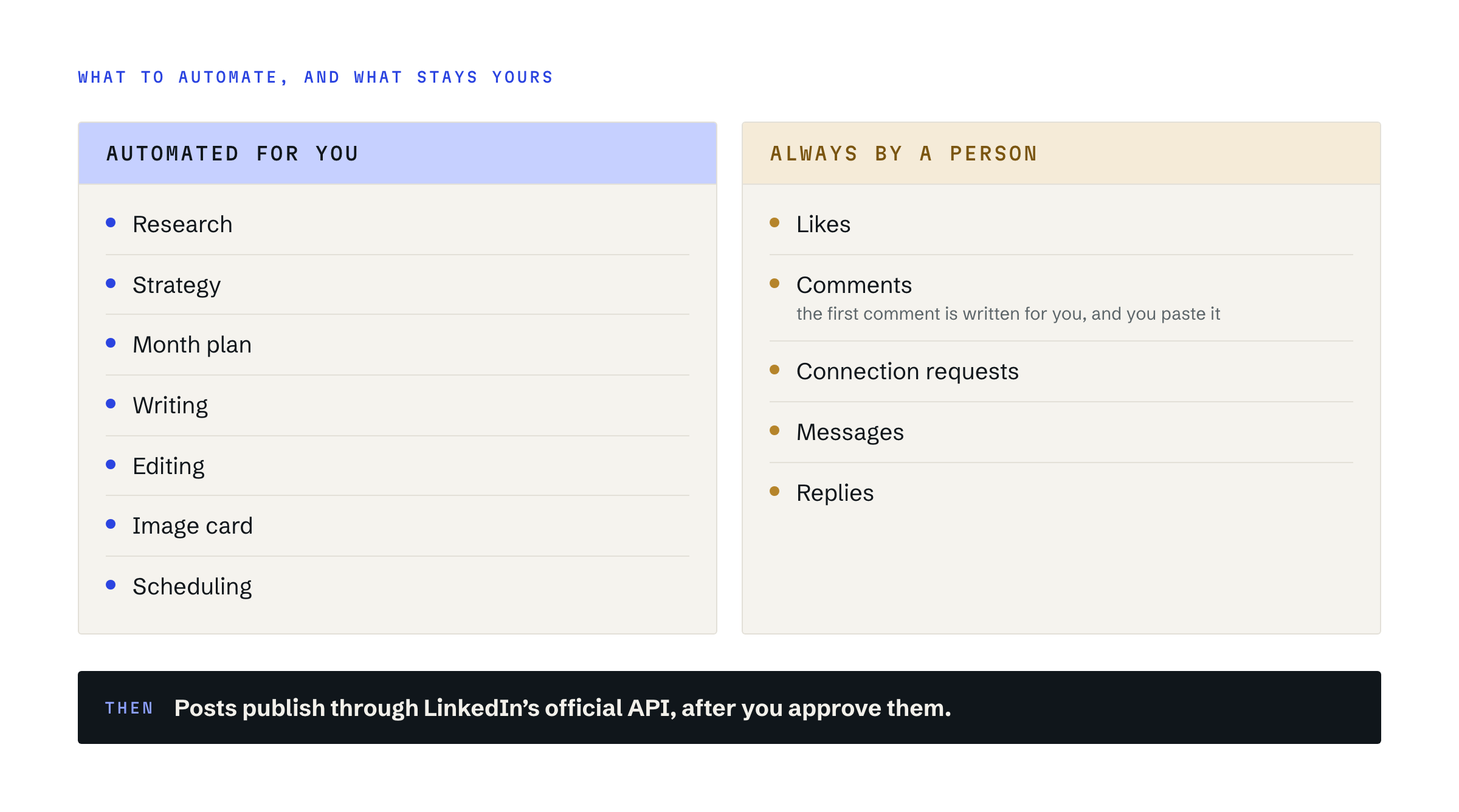
Everything in the left column happens away from LinkedIn's website, or reaches it only through the official API:
- Research. Reading your website, your documents, and what the open web says about your market and your competitors. None of it needs LinkedIn.
- Strategy and planning. Positioning, topics, a month of themed weeks, timing set for the markets you sell to.
- Writing and editing. Drafts in your voice, checked for vague claims and for anything invented.
- Images. A card or carousel drawn from the post's own content.
- Scheduling and publishing. Posting the version you approved, at its planned time, through LinkedIn's official API with your permission.
If you want to automate LinkedIn posts, this is the part to automate. It is also the expensive part.
GoReach can do all five for you. On Autopilot it researches your business and up to four competitors, sets a strategy, plans each month, writes every post in your voice from confirmed facts, and schedules each one you approve. Your part is designed around about fifteen minutes to set up and about five minutes a week.
LinkedIn automation without getting banned: what never to automate
These are the behaviours LinkedIn's own pages are written against. I have kept each one tied to the page that says it.
- Scraping LinkedIn. Section 8.2 of the User Agreement prohibits using software, scripts or robots to "scrape or copy the Services, including profiles and other data from the Services".
- Software on LinkedIn's website. LinkedIn's page on prohibited software and extensions says it does not permit crawlers, bots, browser plug-ins or browser extensions that scrape, modify the appearance of, or automate activity on its website, and that members who use them "risk having their accounts restricted or shut down."
- Automated engagement. The same section of the User Agreement prohibits using "bots or other unauthorized automated methods" to add or download contacts, send or redirect messages, or create, comment on, like, share or re-share posts.
- Engagement pods. LinkedIn's Professional Community Policies say "Don't do things to artificially increase engagement with your content", and ask members not to agree ahead of time to like or re-share each other's content.
One more belongs on the list even though it is about your own safety as much as LinkedIn's rules: handing a tool your password or session cookie so it can run your account from a server. That is automated activity on your account with nobody at the keyboard, and a third party holding your keys.
GoReach does none of these. It never logs in as you and never sees or stores your LinkedIn password. It installs nothing in your browser. Its crawler refuses LinkedIn addresses, so it cannot scrape LinkedIn. It sends no automated likes, comments, connection requests or messages.
Should you automate comments and replies on LinkedIn?
No. This is the awkward middle, and it is where I have the strongest opinion.
Engagement is where founders are most tempted to automate, because replies take time and they matter. They are also where automation does the most damage. A reply written and sent by a bot reads like one, and the people you most want to reach are the ones who notice. On top of that, automated comments are named in LinkedIn's User Agreement.
So GoReach draws the line here on purpose. It writes a first comment for every post and hands it to you to paste, with one-press copy and an email reminder about ten minutes after the post goes live. Posting a comment for you would need a LinkedIn permission GoReach does not hold, and I would rather say that plainly than work around it. Replies to people stay yours. There is more on the first comment and why it matters.
If you want a person to help with replies, Done for you assigns you an expert. It is by invitation after a short call, from $990 a month, and the expert's part is agreed on that call. Help with replies is one of the things they can take on, and you still send those replies yourself.
Why a person stays in the loop
LinkedIn's Developer AI Policy, its rules for developers building AI features on its marketing APIs, tells developers to restrict automated posting of AI-generated content to LinkedIn without the user's involvement. Where generated content will be published under the user's name, the user should get tools to edit it first.
That is also plain good sense. Your name is on every post.
So "automated" in GoReach means the work is done for you and the decision stays with you. Each post arrives with its first comment and three choices, approve, change or skip, in the app or on WhatsApp. Approve schedules exactly that version. Nothing publishes without it.
What if you want LinkedIn outreach automation?
Some LinkedIn automation is about sending connection requests and messages at volume. That is a different job from posting, and the tools built for it reach LinkedIn in different ways. GoReach does no outreach and is not trying to.
If outreach is what you need, read why outreach tools are a different category, and choose with your eyes open about how each one reaches LinkedIn. The questions below work for those tools too.
GoReach is for founders whose buyers read their profile before replying, and who want a steady run of posts in their own voice without spending their week on it.
A short test for any LinkedIn automation tool
The quickest test is the setup screen. If a tool asks for your LinkedIn password or a session cookie, or asks you to install an extension, it is built to act as you on LinkedIn's website, which is the method LinkedIn's pages warn about. If it sends you to LinkedIn's own consent screen to approve posting, it is using the route LinkedIn built for apps.
The fuller version is four questions, set out in what LinkedIn restricts, and a safer alternative to browser bots compares the three kinds of tool side by side. A tool that passes all four is the lowest-risk way to automate your LinkedIn that I know of. It is still not a promise, because nobody but LinkedIn can make one.
Questions founders ask
What LinkedIn automation is allowed?
LinkedIn offers an official API for apps to publish posts on a member's behalf, with permission the member grants on LinkedIn's consent screen. What its rules restrict is scraping, software that automates activity on its website, and bots or unauthorized automated methods that like, comment, connect or message. Publishing through the official API after you approve each post is the lowest-risk way to automate.
How do I automate LinkedIn safely?
Automate the work that happens off LinkedIn: research, planning, writing, images and scheduling. Publish through the official API, approve every post yourself, and keep likes, comments, connection requests and messages in your own hands. Never give a tool your LinkedIn password.
Can my LinkedIn account be restricted for automation?
Yes. LinkedIn says members who use third-party software that scrapes or automates activity on its website risk having their accounts restricted or shut down. Its help page on automated activity tells a restricted member to review and disable that software first.
Will scheduling posts get my LinkedIn account restricted?
Scheduling through LinkedIn's official API, with permission you granted, is what that API exists for. LinkedIn's help pages warn about software that scrapes or automates activity on its website, which is a different method. No tool can promise how LinkedIn treats an account.
How much time does safe LinkedIn automation save?
Research, planning and writing are most of the hours, around thirteen a month for the writing alone at three posts a week, and those are what GoReach takes on. Autopilot is $199 a month or $1,990 a year and is designed around about five minutes a week of approvals. Want to see the writing standard first? Grade a post free, no signup.