LinkedIn on Autopilot, with you approving every post
Research, strategy, a month plan and posts in your voice, done for you. You approve every post, and it goes out through LinkedIn's official API.

Published 9 min read
On this page (7)
LinkedIn on Autopilot, done properly, means the research, the strategy, the month plan, the writing and the scheduling are handled for you, and you approve every post before it goes out. That is how GoReach Autopilot works. It does those hours, sends each post to you on WhatsApp or in the app, and publishes only what you approved through LinkedIn's official API.
Search for "LinkedIn autopilot" and most of what comes back is outreach automation: bots that visit profiles, send connection requests and message people while pretending to be you. That is a different kind of tool, and it is the kind LinkedIn's rules restrict. This piece is about the other kind, and I want the difference to be clear from the first line.
What should a founder hand over?
Ask a founder why they do not post and the answer is nearly always the hours. A post worth publishing takes about an hour once you count deciding what to say, finding the specifics and reading it back. At three posts a week that is around thirteen hours a month.
Doing it properly also means knowing your market and your competitors well enough to say something they are not already saying. That is a long afternoon to start, and an hour or two each month after.
My view is simple. An autopilot should take everything up to the moment of deciding what goes out under your name, and stop there. The decision is the one part that costs a founder seconds and that nobody else can make for them, so it is the one part I kept with you.
The six stages, done for you
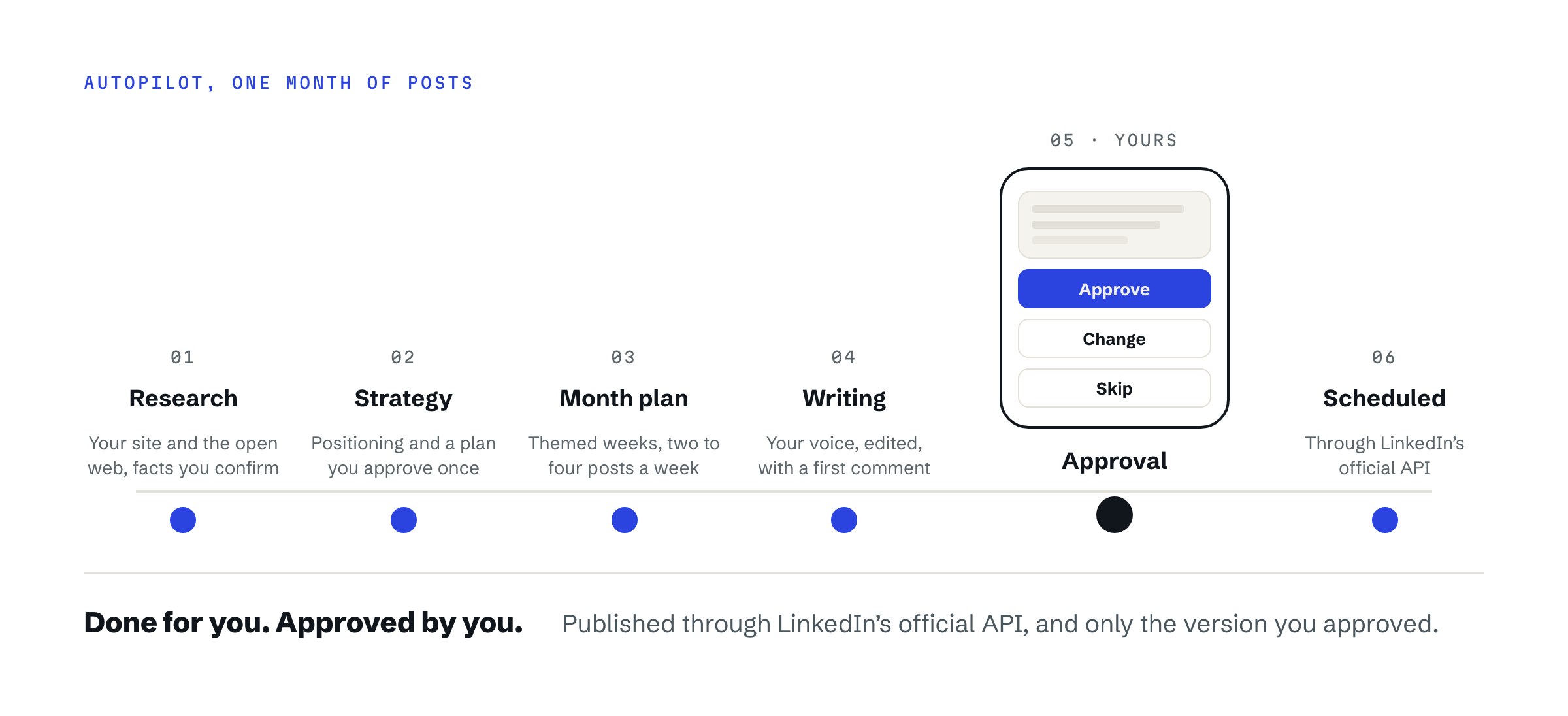
GoReach Autopilot runs in six stages. Each one leaves you something to read, and nothing is published until you say yes.
1. Research on your business
It reads your website, any documents, images or voice notes you add, and what the open web says about you. It never reads LinkedIn pages. Every fact is quoted from its source with a date it is good until, and only confirmed facts are used in posts. By default, facts quoted from your own site or files are confirmed for you, and the rest wait for you. Switch on Review each step to confirm every fact yourself, including which source is right when two disagree.
2. Your competitors and your market
It tears down up to four competitors from their own websites and their customers' reviews: their headline word for word, who they serve, what they charge, the proof they show and what buyers object to. Then it writes a market brief covering what buyers do instead, the claims everyone already makes, where you stand apart, and your buyers' own words.
3. Positioning and a strategy
From that research it proposes your positioning and a strategy aimed at your goal: leads, hiring, investors or standing in your field. Two to four posts a week, three by default, at least a day apart, timed for the markets you sell to. On Auto it is approved once drafted, and you can change any of it.
4. A planned month
Each month is planned in themed weeks, one buyer problem a week, told in order: the problem, how it is solved, the person behind it, and an invitation to talk. Posting days avoid your audience's public holidays and quiet weeks.
When a post needs a story only you have, you get one short question that week instead of a guess. I would rather ask you for one real detail than have the writer invent a plausible one.
5. Posts in your voice
Every post is written in your voice, learned from posts you have already published, and built from confirmed facts. An editor pass then checks the hook, vague claims, tone and anything that looks invented, against the same reach checklist and list of AI tells the free grader uses. It revises up to twice. Each post gets a first comment and, where its format calls for one, an image card or a document carousel drawn from the post itself. Image cards are drawn in your brand colour where your website shows one, and you can page through a carousel before you approve it.
6. Approval and scheduling
Each post reaches you on WhatsApp with its first comment and three buttons: Approve, Change or Skip. You can do the same in the app, or approve the whole week at once. Approve schedules exactly that version for its planned time through LinkedIn's official API. The full flow is in approving from WhatsApp.
After that come weekly and monthly reports, built from the leads you record and the post numbers read from screenshots you send.
How much of your time does it take?
The product is designed around about fifteen minutes once and about five minutes a week. The fifteen minutes is setup: connect LinkedIn, point it at your website and add a few posts you have written. The five minutes is approving.
Those are the figures I designed it around. I do not have customer results to put behind them yet, and I would rather tell you that than quote a number I cannot back.
What I can say is where the time goes instead. The thirteen hours a month move to research, writing and editing you never see, and what reaches you is a finished post you either like or want changed.
Why keep approval on every post?
Two reasons: your name, and LinkedIn's rules.
Your name first. Every post goes out as you, and only you can tell whether it says something you would stand behind. A tool that publishes without asking is asking you to trust it with the thing buyers judge you on. I would not use that tool myself, so I did not build it.
Then the rules. LinkedIn's Developer AI Policy asks developers to "restrict automated posting of AI-generated content to external sites (including LinkedIn)" without the user's involvement, and says that when generated content will be attributed to the user, they "should be provided tools to first edit" it. The policy is written for apps on LinkedIn's marketing APIs, so I treat it as the clearest statement of what LinkedIn expects from AI tools in general. Approval on every post, with a Change button, is how GoReach meets it.
Is LinkedIn on Autopilot safe?
For posting, with you approving every post and publishing through the official API, it is the lowest-risk way to automate your LinkedIn that I know of. For outreach bots, the answer is much less comfortable.
LinkedIn's help page on prohibited software and extensions says it does not permit third-party software or browser extensions "that scrape, modify the appearance of, or automate activity on LinkedIn's website", and that members who use them "risk having their accounts restricted or shut down." GoReach was built to stay clear of every behaviour on that list:
- It publishes through LinkedIn's official API, with the permission you grant on LinkedIn's own consent screen.
- It never sees or stores your LinkedIn password and never logs in as you.
- It installs no browser extension and runs nothing in your LinkedIn session.
- It does not scrape LinkedIn. Its crawler refuses LinkedIn addresses outright.
- It runs no automated likes, comments, connection requests or messages.
- It writes your first comment and hands it to you to paste.
No tool can promise how LinkedIn treats an account, and GoReach is not endorsed by LinkedIn. The full reasoning is in is LinkedIn automation safe, with what is safe to automate and the safer alternative to browser bots.
What it costs
Autopilot is $199 a month or $1,990 a year, in US dollars. There is no free plan and no free trial. If you ask within 14 days of your first payment, we refund what we received; payment processing fees are not returned.
If you would rather write your own posts with help, Pro is $49 a month or $490 a year: voice-matched drafts, a reach grade with fixes, first comments, image cards, and publishing and scheduling through the same official API. If you want a person on it as well, Done for you starts at $990 a month, by invitation after a call, and you still approve every post.
Not ready to pay anything? Grade a post free. It runs the same checklist the Autopilot editor runs, three posts a day, no signup.
Questions founders ask
Can I put my LinkedIn on Autopilot safely?
For posting, yes, with a tool that publishes through LinkedIn's official API after you approve every post. GoReach Autopilot works that way and never logs in as you. Outreach bots that act as you are a different kind of tool, and LinkedIn's rules restrict that behaviour. No tool can promise how LinkedIn treats an account.
How do I automate my LinkedIn posts without losing control?
Automate the research, planning, writing and scheduling, and keep the yes. On Autopilot every post waits for your approval on WhatsApp or in the app, and only the version you approved is published. Nothing goes out while you are not looking.
Is there a done for you LinkedIn service where I still approve each post?
Yes. Autopilot does the work with you approving each post, at $199 a month. Done for you adds an assigned expert from $990 a month, by invitation after a call, and you still approve every post the same way.
Is there an AI LinkedIn ghostwriter that posts for me?
Autopilot writes in your voice and schedules each post through LinkedIn's official API, but only after you approve it. There is no human writer behind Autopilot itself. It will not comment, like or reply for you; it hands you a first comment to paste.
How much time does it take each week?
Autopilot is designed around about five minutes a week to approve posts, after about fifteen minutes of setup once. Those are design figures, and the research, writing and scheduling happen without you.