Approving LinkedIn posts from WhatsApp: how it works
Each post arrives on WhatsApp with its first comment and three buttons: Approve, Change, Skip. One tap schedules it through LinkedIn's official API.

Published 9 min read
On this page (8)
On GoReach Autopilot you approve LinkedIn posts on WhatsApp with one tap. Each post we write for you arrives as its own message with its first comment and three buttons. Approve schedules exactly that version through LinkedIn's official API, Change sends back a revised post from a note you type or speak, and Skip keeps it unpublished. Everything can also be approved in the app.
The research, the planning, the writing and the scheduling are done before the message reaches you. Your part is the yes, and nothing goes out without it.
Why approval is where the week goes
Anyone who has worked with a ghostwriter knows the writing comes back quickly enough. The approval is where a week gets lost.
The writer shares a document. You open it on a laptop between meetings, leave three comments and forget the fourth. By the time the post is final, the week it was planned for is over. At three posts a week that loop quietly becomes a recurring meeting with yourself.
I built approval on WhatsApp because that is where founders already answer things in seconds. The decision goes where you are, in a form you can answer from a taxi, and everything before the decision is already finished.
What arrives when you approve LinkedIn posts on WhatsApp
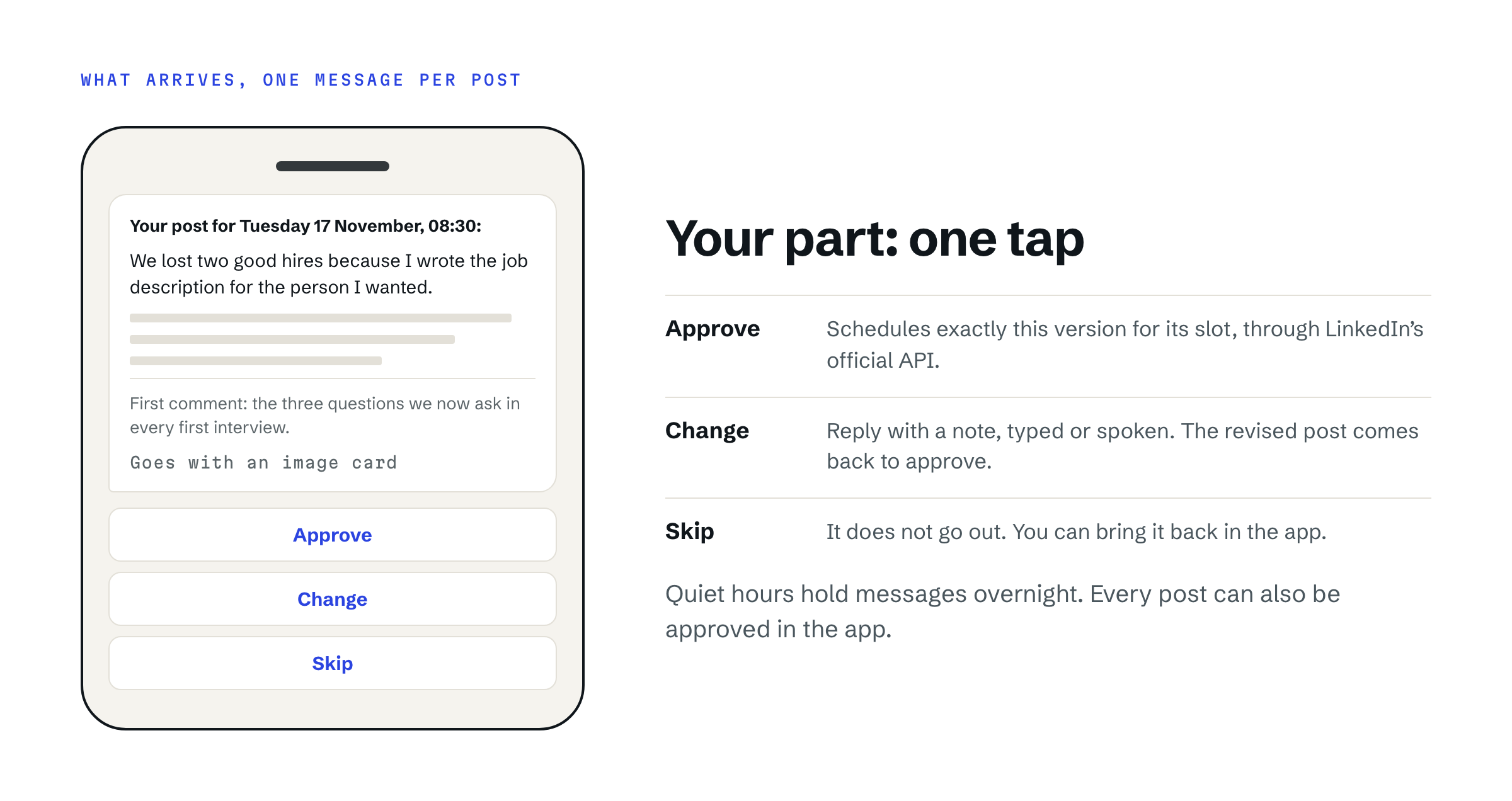
Once your number is linked, each written post comes as its own message. It opens with the slot it is planned for, in your own time zone, then the full post as it will appear on LinkedIn:
Your post for Tuesday 17 November, 08:30:
[the post, in full]
First comment: [the comment written for it]
It goes with an image card, which you can see in GoReach.
The three buttons sit under it. A long post is sent first as text, followed by a short "Approve this post?" message carrying the buttons, because WhatsApp limits how much text a message with buttons can hold. Image cards and carousels are seen in the app, where they render at full size.
Each post has already been through the editor before you see it: written in your voice from confirmed facts, checked against the reach checklist and the list of AI tells, and revised.
How do Approve, Change and Skip work?
Approve schedules that exact version for its planned slot, through LinkedIn's official API, with the permission you gave when you connected your account. GoReach replies with the time it goes out, for example "Approved. It goes out Tuesday 17 November, 08:30." If the slot is less than fifteen minutes away, it is scheduled fifteen minutes from your tap instead.
One safeguard matters more than it looks. A tap only ever applies to the version it was sent with. If the post changed after the message went out, your tap is not applied; you get the current version to approve instead. You never approve words you have not read.
Change asks what you want different. Reply within a day in your own words, typed or as a voice note, which is transcribed. The revised post comes back as a new message with the same three buttons.
Skip keeps the post from going out. It stays in GoReach, and you can bring it back from the app if you change your mind.
What a change looks like
Say a post about your hiring process arrives on Tuesday morning. It is close, but the second paragraph names the wrong role and the ending is softer than you would say it.
You tap Change and send a twenty-second voice note: "The hire was a head of operations. And end it by saying we are hiring again in January, plainly." The revised post comes back with the role corrected and the new ending. You read it once and tap Approve.
The revision is written in the same voice and from the same confirmed facts, so the change lands where you asked for it. If it is still not right, tap Change again.
When do posts arrive on WhatsApp?
WhatsApp limits when a business can message you freely, and GoReach works inside that rule. Posts arrive within the 24 hours after your last message to GoReach. If more than 24 hours have passed, one message a day says your posts are ready, and a reply brings them through. A single reply at the start of the week is enough.
If you do not reply for three days, those posts stop waiting on WhatsApp and stay in the app for you. Nothing is published either way until you approve it.
Then there are quiet hours. By default nothing is sent on WhatsApp between 9pm and 8am in your own time zone, and you can change those hours in settings. A message that falls inside them waits until they end; it is never dropped. You can also pause everything for a while, switch off any kind of message you do not want, or reply STOP.
Can you approve the same posts in the app?
Yes, and some things only live there. Approval works in both places: anything sent to WhatsApp can also be approved, changed or skipped in GoReach, and a notice in the app tells you when posts are ready whether or not WhatsApp is linked. If you would rather read a week of posts side by side, the app lets you approve the whole week at once.
Setup is in the app and takes about fifteen minutes, once: connect LinkedIn, point GoReach at your website, add a few posts you have written and link your number. The strategy and each month's plan are set up there too: approved for you on Auto, the default, or by you if you choose to review each step. Posts always wait for you.
Linking the number is quick. On a computer, the settings page shows a QR code. Scan it with your phone's camera and WhatsApp opens with a short message already typed, including a code; send it as it is and the page updates. On a phone, one button opens WhatsApp with the same message ready. Your ordinary WhatsApp account is enough, and because the number is taken from the message you send, nobody can link a number that is not in their own hands.
WhatsApp carries only what you opted into when you linked it: approvals, the short weekly question about your business, a note when a post is live, a request for its numbers, the weekly summary and alerts. No offers or promotions are sent there.
Does approving from WhatsApp touch your LinkedIn account?
No. WhatsApp carries the message and your tap, and that is all. GoReach publishes through LinkedIn's official API with the permission you grant on LinkedIn's own consent screen. It never logs in as you and never sees or stores your LinkedIn password. It does not scrape LinkedIn, and it sends no automated likes, comments, connection requests or messages.
The first comment is handed to you to paste. When a post goes live, the WhatsApp message gives you its link and the comment to copy. Posting it for you would need a LinkedIn permission GoReach does not hold; more on why you paste the first comment.
It is built to stay within LinkedIn's rules, which makes it the lowest-risk way to automate your LinkedIn that I know of. No tool can promise how LinkedIn treats an account, and I cover the risk question directly in is LinkedIn automation safe.
Who this suits, and what it costs
Approval on WhatsApp is part of Autopilot, at $199 a month or $1,990 a year in US dollars, designed around about five minutes a week once it is set up. There is no free plan and no free trial. It suits founders who want the posts done and only want to say yes. For the whole picture, read what LinkedIn on Autopilot should mean when you approve every post and the official API publishes it.
If you work with a ghostwriter today, the same loop applies: the bottleneck is how quickly you can say yes. Autopilot replaces the shared document with one message per post, and the weekly interview with one short question a week, answered by voice note if you like. Compare it with what a ghostwriter costs. If you want a person reading your posts before you do, Done for you adds an assigned expert from $990 a month, by invitation after a call, and you still approve every post.
If you would rather write your own posts, Pro at $49 a month or $490 a year is the better fit. To test the quality bar on a post of your own first, use the free grader.
Questions founders ask
Is there a LinkedIn post approval workflow that works from my phone?
Yes. On GoReach Autopilot each post arrives on WhatsApp with Approve, Change and Skip, and one tap schedules it through LinkedIn's official API. The same posts can be approved in the app, one at a time or a whole week at once.
Can I approve ghostwritten LinkedIn posts without a shared document?
Yes. Each post comes as one WhatsApp message with its first comment. If something is wrong, tap Change and reply with a note or a voice note, and the revised version comes back to approve.
Can GoReach post to LinkedIn without my approval?
No. Every post waits for your approval, and only the exact version you approved is scheduled. If you never reply, nothing is published.
Does approving on WhatsApp give anyone access to my LinkedIn account?
No. WhatsApp only carries the message and your tap. Publishing happens through LinkedIn's official API with the permission you granted on LinkedIn's own screen, and GoReach never logs in as you.
Do I need WhatsApp Business?
No. Your normal WhatsApp account works. You link it once in GoReach settings by sending a prepared message, and you can pause it, set quiet hours or remove the number at any time.