A weekly LinkedIn report for founders: what to track
Followers tell a founder very little. A useful weekly report says what went out, what it led to and what the numbers showed, and leaves the decision to you.

Published 9 min read
On this page (8)
LinkedIn analytics for founders should answer three questions each week: what went out, what it led to, and what the numbers showed across the posts. The conversations a post started matter most, and impressions and reactions help explain them. Track those weekly, read the patterns monthly, and judge revenue each quarter, because a single week of LinkedIn numbers is mostly noise.
Doing that by hand takes, by my estimate, the better part of an hour a week. You collect the numbers, try to remember which conversation came from which post, and turn it into a decision. It is the first habit to go when the week gets busy. GoReach Autopilot builds the report for you each week and each month, from the leads you record and the numbers it reads from your screenshots. It never logs in to your LinkedIn to get them.
Why follower counts mislead founders
A founder posting to win clients is playing a different game from a creator posting to grow an audience. A creator sells attention, so followers and impressions sit close to revenue. A founder needs a handful of conversations with the right people.
That changes what counts. A post seen by 800 people, three of whom run companies you would love to work with and one of whom sends a message, did its job. A post seen by 20,000 people in the wrong industry did less, however good the chart looks.
Reach still belongs on the page, because a post nobody sees cannot start a conversation. It is there to explain the result.
What should LinkedIn analytics for founders actually track?
Three things, in this order.
What went out. The posts published that week, with the topic and the format, and whether the plan was kept. A skipped post is information too.
What it led to. Every conversation you can trace to a post: a direct message, a call booked, a signup, an introduction, a prospect who mentioned a post on a sales call. This is the line that tells you whether posting is working for your business.
What the numbers showed. Impressions, reactions, comments and reposts per post, grouped so you can see which topics and which formats reached people. Grouped is the important word. One post's numbers on their own tell you almost nothing.
Then you decide what changes. One or two decisions, no more: "the how-to posts drew replies from operations directors, so write more for them."
That last step is deliberately left to you in GoReach's reports. They state what happened, with the numbers attached, and stop there. No model writes the report, so it cannot invent a trend or promise a change nobody is going to make. I would rather hand you three true sentences than a paragraph of confident advice.
Where the numbers come from, honestly
A report holds two kinds of information, and they live in different places.
Post numbers. LinkedIn shows you analytics for each of your own posts. Copying them out every week is the tedious half of reporting by hand.
Leads. No analytics screen shows these. A message, a booked call or a mention on a sales call exists only in your inbox, your calendar and your memory, and memory is unreliable after a week. "Someone messaged about the pricing post" is about all most founders can recall by Friday.
Revenue is a third thing, and it does not belong in a weekly report. Most B2B sales take longer than a week, and a client who signs in March may have first read you in December. Track the conversations weekly and hold revenue up against them each quarter.
Here is how GoReach handles each one, because I think you should know exactly where every number on your report came from.
- Leads are what you tell us. When a post brings a call, a message, a signup, a booking or a payment, you record it against that post, with a note if you like. GoReach never infers a lead, so the count on your report is your count.
- Post numbers come from a screenshot. You send a screenshot of a post's own analytics page, or type the numbers in. GoReach reads it and checks the reading. If it is unsure of a number, if a count went down since the last reading, or if the post in the screenshot does not look like the one it is filed against, that reading is held back for a person to check and stays out of the report.
- Clicks are not tracked. Links in your posts are your own, untouched. So the report never claims to know about a click it cannot see.
LinkedIn's analytics API needs an approval we do not hold, and reading your numbers out of your logged-in session is something I decided GoReach would never do. The screenshot is the honest route that is left.
What a filled-in week looks like
Here is a week for an invented consultancy that helps logistics firms cut warehouse costs.
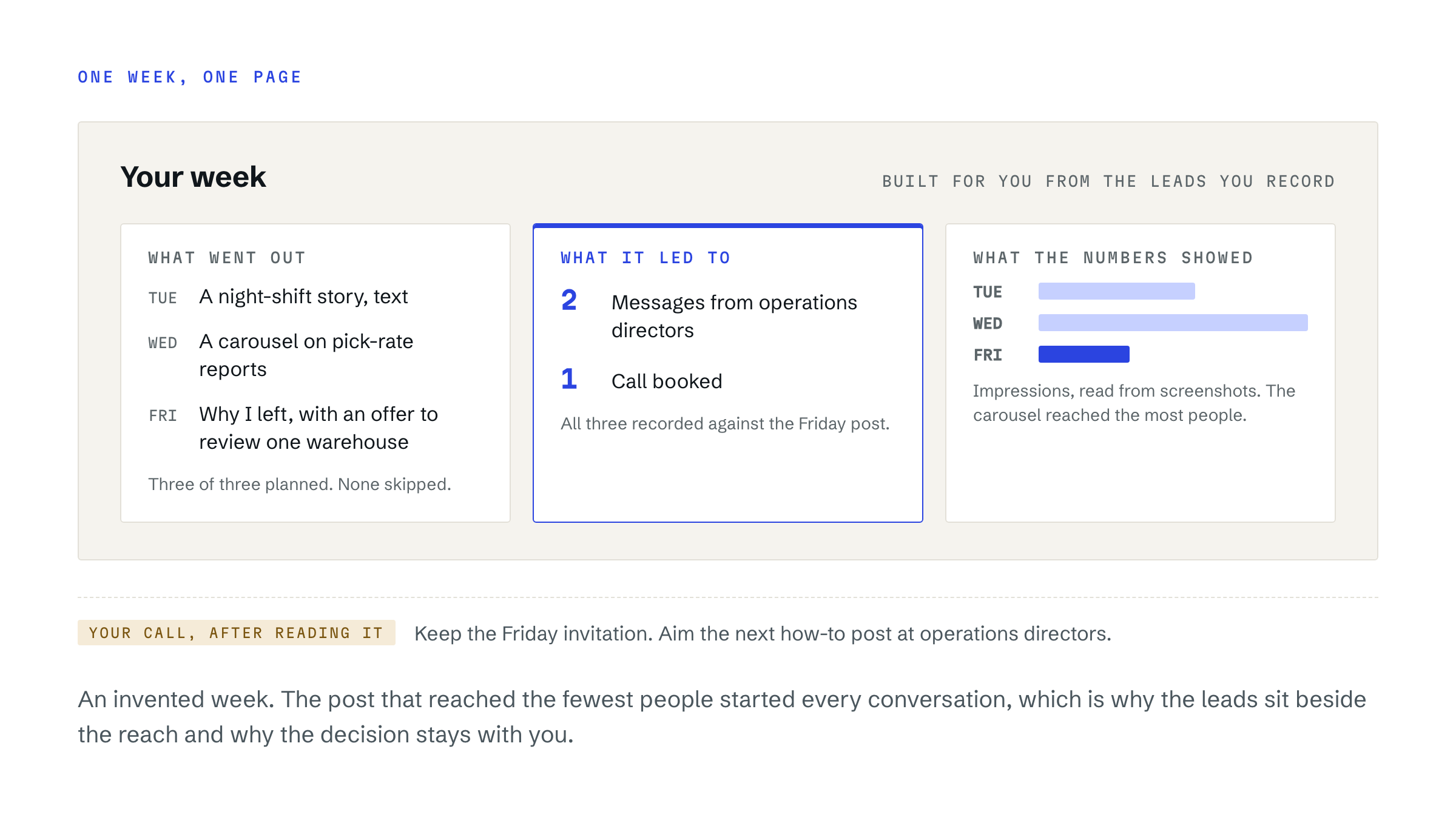
- What went out: three posts, as planned. Tuesday, a story about a client's night shift, as text. Wednesday, a carousel on reading a pick-rate report. Friday, why the founder left a large consultancy, ending with an offer to review one warehouse's numbers.
- What it led to: two messages from operations directors, both after the Friday post. One call booked.
- What the numbers showed: the carousel reached the most people. The Friday post reached the fewest.
The post with the fewest impressions was the one that did the work. A report built on reach alone would have told this founder to make more carousels and drop the Friday post, which is exactly backwards.
The decision that week writes itself: keep the Friday invitation, and aim the next how-to post at operations directors, since they are the ones replying.
On Autopilot this page is built for you. Your part is the leads you recorded and, if you want the numbers, a screenshot of each post.
The monthly view, and what not to read into one week
One week is noise. Reach on a single post moves around for reasons you cannot control, such as who happened to be online and what else was in the feed. Over four weeks patterns start to appear: which topic drew conversations, which format your buyers responded to.
You need enough posts to see a pattern, which is one more argument for a steady two to four a week. And you need someone to look across the month, which is the step nobody does by hand.
A few things a single week cannot tell you. A flat week does not mean posting has stopped working. One big post is a question to ask, about why it worked and whether the people who engaged were buyers, more than a strategy to copy. And no leads in week two is normal, because buyers usually read you several times before they write. Judge a cadence over a couple of months, against the goal you set for posting.
GoReach's reports are built for this. A weekly one covers Monday to Sunday and a monthly one covers the calendar month, both in your own time zone, and each is built the morning after its period ends and emailed to you. Posts are grouped by topic and by format, and no comparison is drawn from fewer than two measured posts, because one post is not a pattern. A post with no numbers yet is listed as missing, never filled in.
Reporting without touching your LinkedIn account
Some reporting tools get their numbers by running software in your browser or by logging in to your LinkedIn as you. LinkedIn's help page on prohibited software and extensions says it does not permit software that scrapes or automates activity on its site, and that members using it risk having their accounts restricted or shut down.
GoReach stays off that path entirely. It publishes your approved posts through LinkedIn's official API, with the permission you grant when you connect. It never logs in as you. It does no scraping, and it sends no automated likes, comments, connection requests or DMs. Even the first comment is handed to you to paste.
That is why the report is built from what you hand over, a recorded lead or a screenshot, and it is why I describe GoReach as built to stay within LinkedIn's rules, the lowest-risk way to automate your LinkedIn. No tool can promise how LinkedIn treats an account. More on why we stay off your LinkedIn session.
The time a weekly LinkedIn report gives back
By hand, a weekly report plus a monthly review is roughly an hour a week, and it is the work that stops first.
On Autopilot, at $199 a month or $1,990 a year, the reports come with everything else: research on your market, a strategy and a planned month, every post written and edited in your voice, approval in the app or on WhatsApp, and scheduling for each post you approve. Your weekly part is designed around about five minutes. Approve the posts, and record a lead when one arrives. That is what we mean by LinkedIn on Autopilot, with you approving every post.
Questions founders ask
What LinkedIn metrics should a founder track?
Conversations first: replies, calls and introductions you can trace to a post. Then impressions, reactions and comments per post, grouped by topic and format, as context. Followers matter least for a founder selling to other businesses.
How do I track leads from LinkedIn posts?
Write down every conversation that mentions or responds to a post on the day it happens, against that post, and ask new prospects how they found you. On Autopilot you record the lead against the post in a few seconds, and the weekly report counts it.
How do I measure LinkedIn ROI as a founder?
Count conversations weekly and compare revenue against them each quarter, since most B2B deals take longer than a week to close. A client who signs this quarter may have started reading you two quarters ago, so short windows undercount what posting did.
Does GoReach use LinkedIn's analytics or track clicks?
No to both. Post numbers come from screenshots you send, which GoReach reads and checks, or numbers you type. Links in your posts are your own and untracked, and GoReach never logs in to your account.
How long before LinkedIn posting shows results?
It varies, and anyone who promises a timeline is guessing. Buyers often read you several times before they get in touch, so judge a cadence over a couple of months.