LinkedIn competitor analysis for founders
Read what competitors claim on their own sites and what their customers complain about, then post the claim nobody makes. No LinkedIn scraping needed.

Published 10 min read
On this page (8)
For a founder, LinkedIn competitor analysis means reading what your competitors claim on their own websites and what their customers say in public reviews, then posting about the thing nobody in your market is saying. It never means scraping LinkedIn. By hand it takes an afternoon or more for four competitors, and it needs redoing every quarter.
That last part is why most founders never do it. The first pass feels useful. The second pass, three months later when every homepage has quietly changed, is the one that never happens.
What LinkedIn competitor analysis should mean for a founder
Most guides to competitor analysis for LinkedIn content are written for social media teams. They are about company pages: follower growth, posting frequency, engagement rates. That is a reasonable thing for a team to track.
It tells a founder very little. A buyer does not choose a supplier by comparing engagement rates, and I have not seen good evidence that a rival's likes predict anything about who wins the deal.
Think about what a buyer actually does. They read a few homepages, skim some reviews, ask a peer, and look at the founder's profile. So the analysis that improves your posts answers three questions:
- What does every competitor already claim?
- What do buyers complain about after they have bought?
- What can you say, with proof, that none of them says?
The third answer is the one your posts should keep coming back to. The first two are how you find it.
Which competitors should you analyse?
Four is enough. More than that and the notes stop fitting in your head.
- Two direct competitors: the names that come up most often on your sales calls.
- The larger default: the option a buyer considers first, before they have heard of you.
- Whatever buyers do instead of buying: a spreadsheet, an in-house hire, a freelancer, or nothing at all.
That last one matters more than founders expect. Often the real competition is the status quo, and posts that speak to it land with buyers who have not started looking yet. Those are the people you most want reading your profile.
What to read on a competitor's website and in their reviews
On each competitor's own site, write down six things:
- the homepage headline, word for word
- who they say they serve
- the pains they lead with
- their published price, or the fact that they hide it
- how a buyer gets in: a demo, a trial, a call
- the proof they show: logos, numbers, case studies, stars
Then read their customers' reviews, which tell you what happened after the sale. My advice is to start with the three-star reviews. Five-star reviews are often short and one-star reviews often describe something unusual. The middle is where people explain what they wanted and did not get.
Copy the exact phrases buyers use there. They make some of the best opening lines you will ever write, because other buyers recognise their own words.
Reading four competitors this way, carefully and with notes, is the afternoon.
Why you should not scrape LinkedIn for competitor research
Plenty of tools will offer to pull a competitor's posts, followers or engagement straight off LinkedIn. That is scraping, and LinkedIn says so plainly.
Section 8.2 of LinkedIn's User Agreement lists what members agree not to do. One item is to use "software, devices, scripts, robots or any other means or processes" to "scrape or copy the Services, including profiles and other data from the Services". Its help page on prohibited software and extensions says LinkedIn does not permit third-party software, including crawlers, bots, browser plug-ins or extensions, that scrape, modify the appearance of, or automate activity on its website, and that members who use it "risk having their accounts restricted or shut down."
So the risk lands on your account. And it lands there for information that tells you little about how buyers choose.
You do not need it anyway. Everything a buyer uses to compare you is on the open web: homepages, pricing pages, review sites, forums. That is where LinkedIn competitor research without scraping gets its material, and it is better material. If you are weighing up a tool that does read LinkedIn, read is LinkedIn automation safe first, and see how the safer kind of tool compares with tools that scrape LinkedIn.
How to find content gaps competitors leave open
Put your notes side by side and the gap usually shows itself. Here is an invented example, for a bookkeeping firm that serves dental practices.
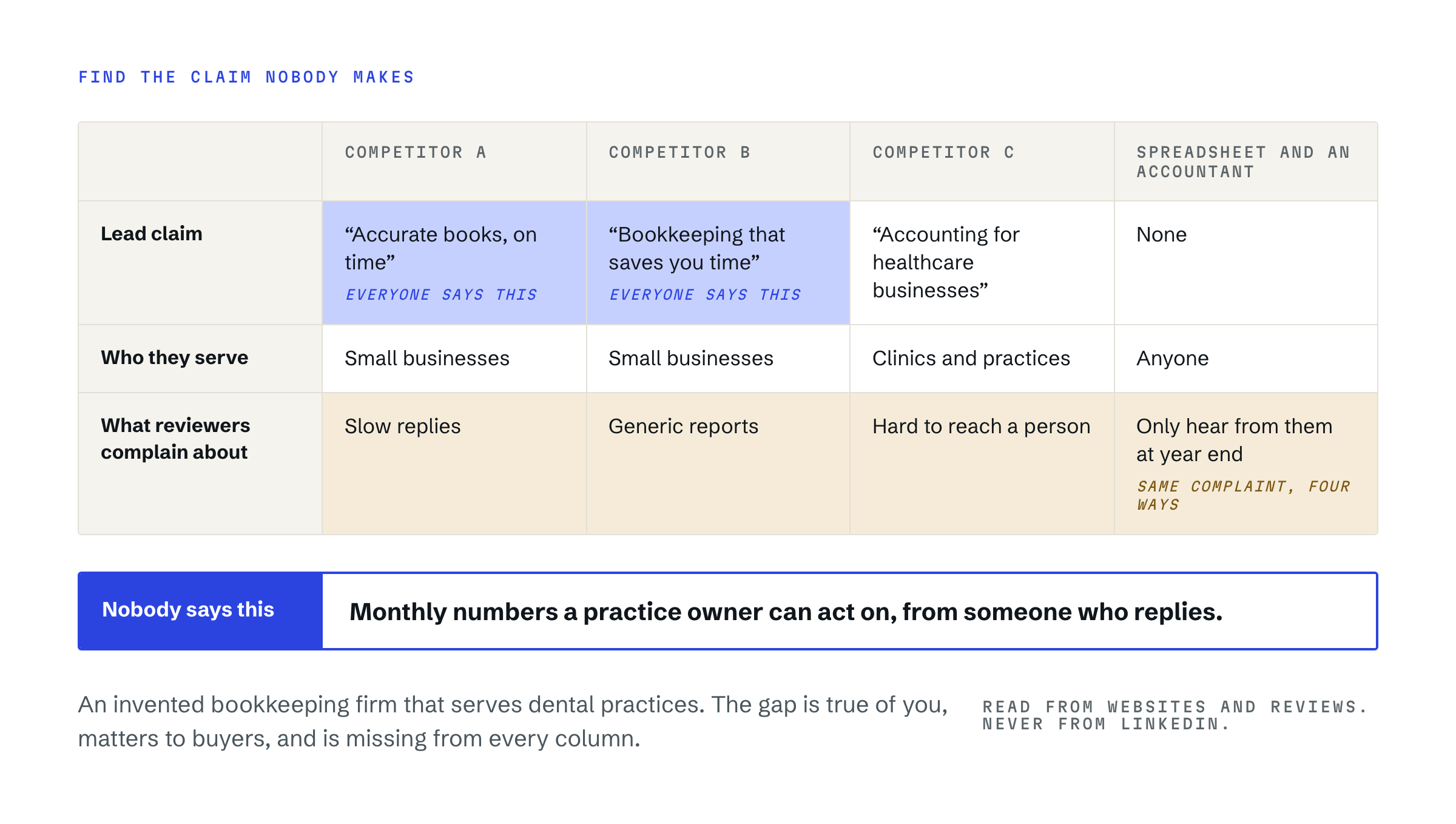
Read across the rows:
- Headlines. Competitor A says "Accurate books, on time". Competitor B says "Bookkeeping that saves you time". Competitor C says "Accounting for healthcare businesses". The fourth column, a spreadsheet and an accountant, says nothing, because it does not need to.
- Who they serve. Small businesses, small businesses, clinics and practices, anyone.
- What reviewers complain about. Slow replies. Generic reports. Hard to reach a person. Only hearing from them at year end.
Two of the three competitors lead with accuracy or time. Nobody mentions what a practice owner most wants to know, which is whether each chair and each hire is paying for itself. And the complaint is the same in all four columns, in different words: reports and contact that tell the owner nothing until it is too late.
The gap is a claim that is true of you, that buyers care about, and that nobody else is making. In this example it is monthly numbers a practice owner can act on, from someone who replies.
That sentence becomes your positioning, the one line every post leans on.
How to turn competitor analysis into LinkedIn posts
The table yields more posts than founders expect. A few that fall straight out of the example:
- The claim everyone makes, examined without naming anyone. "Every bookkeeper promises accurate books. Here is what accurate books still will not tell you."
- A complaint from the reviews, answered with a real example of how you handle it.
- A buyer's own phrase used as the opening line.
- The status quo, priced. What the spreadsheet is costing them, specifically.
Two rules keep these posts safe for your reputation.
First, do not name and criticise competitors. It is hard to prove, it invites a reply, and your buyer may have chosen that competitor before. Write about the claims and the gaps, and let readers draw the comparison themselves.
Second, only claim what you can prove. A gap you cannot support becomes a promise you have to walk back. We hold our own comparison pages to the same two rules, and it is harder than it sounds.
Spread across a month, a single gap can carry a whole series: one buyer problem per week, told in order. That is how the month plan is built.
Competitor research done for you: how GoReach does it
Everything above is the method. If you would rather not spend the afternoon on it, or the repeat every quarter, GoReach Autopilot does the reading and the write-up for you. Here is exactly what it does, because a research tool is only as good as what it refuses to make up.
It finds the competitors. It runs two searches, one for sites that read like yours and one for companies selling what you sell, then throws out anything that is not a real competitor: your own business under another address, directory and "best tools" pages, blog posts. It tears down up to four of the ones that remain.
It reads their public websites only. For each competitor it reads the home page and the pages that matter for a teardown, such as pricing, product, proof, comparisons, FAQ and about, plus what customers say on review sites and forums. It records the six things from the list above, along with the objections buyers raise and customer quotes.
It never reads LinkedIn. The crawler refuses LinkedIn's addresses outright, so it cannot read a LinkedIn page even by accident, and the search providers it uses are never sent a LinkedIn link.
It checks its own work. The failure I worried about most when we built this was an invented price, because that is the classic failure of automated competitor research. So a headline and every customer quote must appear word for word in what was read, and a price must appear on the page it is attributed to. Anything that fails is dropped. A price that is not published is recorded as not public, never estimated.
From those teardowns it writes a market brief: what buyers do instead, the claims everyone already makes, the white space, where you stand apart, your buyers' own words, and objections answered with your proof. Your positioning and strategy are built from it, and you can change both. Each month is then planned in themed weeks, and every post is written in your voice from confirmed facts.
By hand, the honest total is an afternoon of reading for four competitors, another session turning it into a position, and the same again every quarter. Most founders do the first and skip the rest.
On Autopilot, at $199 a month or $1,990 a year, the research, the brief, the positioning, the month plan and every post are done for you. Your part is designed around about fifteen minutes to set up and about five minutes a week to approve posts, in the app or on WhatsApp.
And because the research never touches LinkedIn, it adds nothing to the risk on your account. Posts go out through LinkedIn's official API after you approve them; GoReach never logs in as you, and it sends no automated likes, comments, connection requests or messages. It is built to stay within LinkedIn's rules. No tool can promise how LinkedIn treats an account, but this is the lowest-risk way I know to automate the work.
Questions founders ask
How do I do competitor analysis for LinkedIn content?
Read each competitor's website and their customers' reviews, and list what they all claim and what buyers complain about. Find the thing none of them says that you can prove, and make that the line your posts keep returning to. GoReach Autopilot can do the reading and the brief for you.
Is it allowed to scrape competitors' LinkedIn posts?
LinkedIn's User Agreement prohibits using software, scripts or robots to scrape or copy its services, including profiles and other data. Its help pages say members who use such software risk having their accounts restricted or shut down. GoReach never reads LinkedIn pages.
How many competitors should I analyse?
Up to four: the two direct competitors you hear about most on sales calls, the larger default a buyer considers first, and whatever buyers do instead of buying anything. The last one is often the real competition.
Should I mention competitors by name in my LinkedIn posts?
Rarely. Naming and criticising a competitor is hard to prove, invites a reply, and can insult a buyer who chose them before. Write about the claims and the gaps, and let readers make the comparison.
How often should competitor research be redone?
Every quarter, or sooner when a competitor launches something, changes its pricing or rewrites its homepage. On Autopilot, the facts behind your posts carry a date they are good until and are re-read monthly.